2015年1月11日星期日

Vigica Android TV XBMC smart tv boxes


How to Install XBMC skin plug on your Vigica Android TV Box

and how to installation The plug-in icon-top on your Vigica Android TV Box

①how to install XBMC plug
1、Set with the remote control or a mouse click system

2、Click extensions


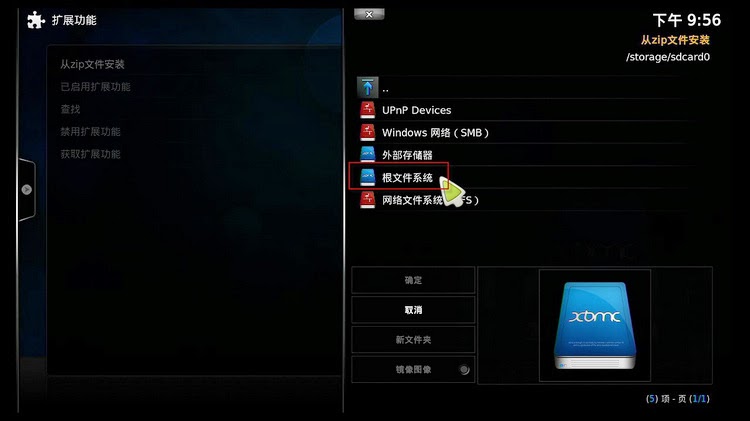
3、Click Install from ZIP files

4、Select the root file system


5Enter the mnt directory
6Enter sda1 directory, which is U disk directory


7There is already a plugin library file: HDP plug-in library, can be downloaded from the official forum hdpfans
8In the lower right corner to see the plug-in library might have been turned on, but not yet to download and install the plug

9
Get into the extended functions


10hdpfans Chinese plug-in library on the inside, to point out to enter


11There are two categories
12Find their own interest to install
13Install the plug

how to installation The plug-in icon-top on your Vigica Android TV Box

1Entering the System Setup "user interface, click on the skin, and then click on the right [setup]


android tv box c60s smart tv box dvb-s

Andrew system DVB-S2 satellite receiver HD player-USB feature

Now, with all kinds of TV boxes, people watch TV with more choices, no longer limited to cable TV. But faced with all kinds of boxes, how to make a sensible judgment and choice is a big problem. Below i will explain the feature of the C60S USB ports, hoping this would help you  to choose a box.

Android Smart TV Box C60s have three USB ports.One in front of the box,two behind the box. Just as the photo showing.This three ports have many ways to read multimedia files. USB plug u disk or removable hard disk, how many there are,how many will on the show,if you have multiple partitions by multiple computing. Of course, you can operation related video, audio and photo directly,then play it respectively.
There can insert a usb wireless receiver,using the wireless air mouse to control the tv box.


You can insert a u disk,to see your photo,listen music or see the video. You can find your u disk on the filebrower to check your file.


Or you can see your photo from pictureplayer,go into the picture you will see that.


You also can listen music from musicplayer.


You can record the video you,save and play it any time.

Application examples discussed in this paper shows that C60s tv box are able to through the USB interface to control functions based on Android.

2015年1月9日星期五

DVB+ Android TV Box Vigica C60S

How to Watch Video Music Picture Via XBMC from USB Drive vigica android tv box

How to Watch Video Music Picture Via XBMC from USB Drive

How to Watch Video Music Picture Via XBMC from USB Drive
On the main menu,enter Video--Profile 
1.Add
2.Go to the root file system
3.Go to the MNT directory (usually U disk and hard drive are mounted in this directory)


4.Enter sda1 (This directory may be sdb1, etc.)


5.Video may be general in the root directory 


 6.Name it


7.Then setting the filter criteria, it will be move the video to the VIDEO SET, 
you can also go directly to quickly select the Subtitle files can be placed 
in the same directory ,or the video can also be placed in a special catalog 
titles, enter [System Settings] [Video] [caption]to set it 


8.You can change the font color


9.Affection


10.Add a picture the picture directory ,too
  
  1. 11.Affection
12.Press the "OK" button to rotate around 
13.The same to to add music

14.Support CUE index segments player
15.Affection
 
 
More to contact with us:
Website: www.vigica.cc